
Have you ever entered a temporary email address into a registration form, clicked Sign Up, and received an error saying that disposable email addresses are not allowed?
You're not alone. Many websites and online services restrict temporary email addresses, even when the address is correctly formatted and capable of receiving messages.
This can be frustrating, especially when you only need an email address for a quick verification, a short-term registration, or a simple task. However, websites usually have specific reasons for rejecting disposable email.
These can include preventing fraudulent registrations, reducing promotional abuse, improving email deliverability, and maintaining reliable communication with users.
Understanding why these restrictions exist can help you decide when temporary email is appropriate and when a regular email address or email alias is a better option.
In this guide, we'll explain why websites block disposable email addresses, how they identify them, what happens when an address is rejected, and what you can do if you believe your legitimate registration has been blocked unfairly.
What Is a Disposable Email Address?
A disposable email address is an email address intended for temporary use rather than long-term communication. It allows someone to receive messages without using their primary personal or business email address.
Disposable email is also commonly called temporary email, temp mail, throwaway email, or a disposable inbox.
For example, someone might use a temporary address to receive a one-time verification message, test an application, or keep a short-term registration separate from their main inbox.
Unlike a conventional email account, a temporary mailbox may have a limited lifespan. Its availability and message-retention rules depend on the service providing it.
Temporary email has legitimate uses, including privacy-conscious browsing, software development, and quality assurance testing. However, the same characteristics that make disposable addresses convenient can also make them attractive to people who want to abuse online services.
That is one reason websites sometimes choose to block them.
If you'd like to understand the basics before continuing, visit the Temp-Emails.org homepage to learn about temporary email and its intended uses.
1. Preventing Fake Accounts and Automated Registrations
One of the main reasons websites restrict disposable email addresses is to reduce abusive account creation.
Email addresses are commonly used during registration to identify an account, confirm that a user can receive messages, and provide a way to contact the account holder later.
Disposable addresses can make it easier to create multiple accounts without using a separate permanent email account for each one.
For example, imagine a website that allows visitors to create an account and receive a limited number of free credits. A person might attempt to register repeatedly with different temporary addresses to obtain additional credits.
The same problem can affect online communities, software platforms, digital marketplaces, and services that limit access to registered users.
A website may respond by checking whether the submitted email address belongs to a known disposable email domain.
This doesn't mean every person using temporary email intends to abuse a service. Many users simply want to protect their primary inbox. However, a website may decide that accepting disposable addresses creates too much risk for its particular business model.
The important distinction is that an email restriction is usually a policy decision, not proof that an individual user is doing something wrong.
2. Preventing Free-Trial and Promotional Abuse
Free trials, discount codes, referral bonuses, and promotional credits can attract new customers. Unfortunately, they can also create opportunities for repeated signups.
Consider a software company offering a seven-day free trial. If its trial system relies heavily on email registration, someone might attempt to create multiple accounts to keep accessing the trial without becoming a paying customer.
Similarly, a website offering a new-user discount may want to prevent the same person from claiming that promotion repeatedly.
Disposable email addresses can make it easier to register multiple accounts because users don't necessarily need to maintain multiple permanent inboxes.
To reduce this risk, a business might:
-
Block domains known to provide disposable email.
-
Limit the number of registrations associated with a user or device.
-
Monitor unusual registration patterns.
-
Require additional verification for suspicious activity.
-
Apply restrictions to promotional benefits rather than blocking all registrations.
Email-domain filtering is only one possible control. Businesses may combine it with other signals to make a decision.
For companies that depend on subscriptions or limited promotional offers, preventing repeated abuse can help protect revenue and ensure that promotions remain available to legitimate customers.
3. Keeping Email Addresses Reachable
Another reason websites reject temporary email addresses is that they may need to contact users in the future.
An email address isn't always used for a single verification message. It can also be an important communication channel throughout the lifetime of an account.
A service may need to send:
-
Password-reset instructions
-
Security alerts
-
Billing notifications
-
Subscription updates
-
Account-recovery messages
-
Important changes to its terms
-
Receipts and transaction confirmations
A disposable address may expire, become inaccessible, or stop receiving messages before the website needs to contact its owner again.
This creates a potential problem for both sides.
The user may lose access to their account because they can no longer receive a password-reset email. The website may also have difficulty delivering important notifications or helping the user recover access.
For this reason, services that handle payments, sensitive information, long-term accounts, or ongoing subscriptions may prefer permanent email addresses.
A permanent address does not guarantee that a message will be delivered, of course. Mailboxes can be abandoned, providers can reject messages, and users can lose access to their accounts. However, a maintained email account is generally better suited to long-term communication than a mailbox intended to expire.
Use a permanent email address whenever continued access to an account matters.
4. Reducing Spam and Protecting Online Communities
Websites that accept user registrations may face spam, fake profiles, promotional abuse, and automated activity.
Disposable email addresses can sometimes be used as part of these activities because they allow someone to create accounts without maintaining a long-term email identity.
For example, an online forum might experience repeated spam registrations. A marketplace could encounter fake seller accounts, while a community platform might receive automated signups intended to post unwanted links.
In response, administrators may block disposable email domains associated with previous abuse.
This approach can reduce some unwanted registrations, but it also has limitations.
A legitimate person might use a temporary email address for privacy reasons and be rejected even though they have no intention of sending spam. Meanwhile, someone who wants to abuse a platform may use a regular email account.
For that reason, disposable-domain blocking works best as one part of a broader abuse-prevention strategy rather than as a perfect method of identifying bad actors.
Websites must balance the desire to reduce abuse with the need to make registration accessible to legitimate users.
5. Protecting Email Deliverability and Contact Data
Email deliverability refers to the ability of a message to reach its intended destination. Successful delivery depends on multiple factors, including the recipient's mail server, sender configuration, reputation, and filtering systems.
Disposable email addresses can complicate contact management in some situations.
For example, a business may collect email addresses to send product updates or account notifications. If many addresses become unavailable shortly after registration, the business may accumulate contacts that it cannot reliably reach.
This can make its contact database less useful and create additional work for support and marketing teams.
However, it is important to distinguish between disposable addresses and invalid addresses.
A temporary email address can be technically valid and capable of receiving a message. A permanent address can also be invalid, abandoned, or unable to accept mail.
Blocking disposable domains therefore does not automatically guarantee better deliverability. It is a policy choice intended to address a particular set of risks.
Responsible businesses should also use appropriate email verification, permission-based mailing practices, bounce monitoring, and contact-list maintenance.
6. Protecting the Quality of Registration Data
Some businesses rely on registration information to understand their customers, manage subscriptions, provide support, and measure how people use their services.
If a large proportion of registrations use addresses that become inaccessible, the business may find it harder to maintain reliable contact information.
For example, a company providing a long-term learning platform may need to send course updates, certificates, account notifications, or information about changes to a user's subscription.
If the registered address is no longer accessible, those communications may never reach the person who needs them.
A disposable email address doesn't necessarily mean that the registration information is false. Someone can use a temporary address for a perfectly legitimate reason.
Nevertheless, a business may decide that users of its service should provide an email address they expect to maintain.
The appropriateness of this requirement depends on the service. A website offering a downloadable public resource has different communication needs from a platform managing long-term customer accounts.
7. How Do Websites Detect Disposable Email Addresses?
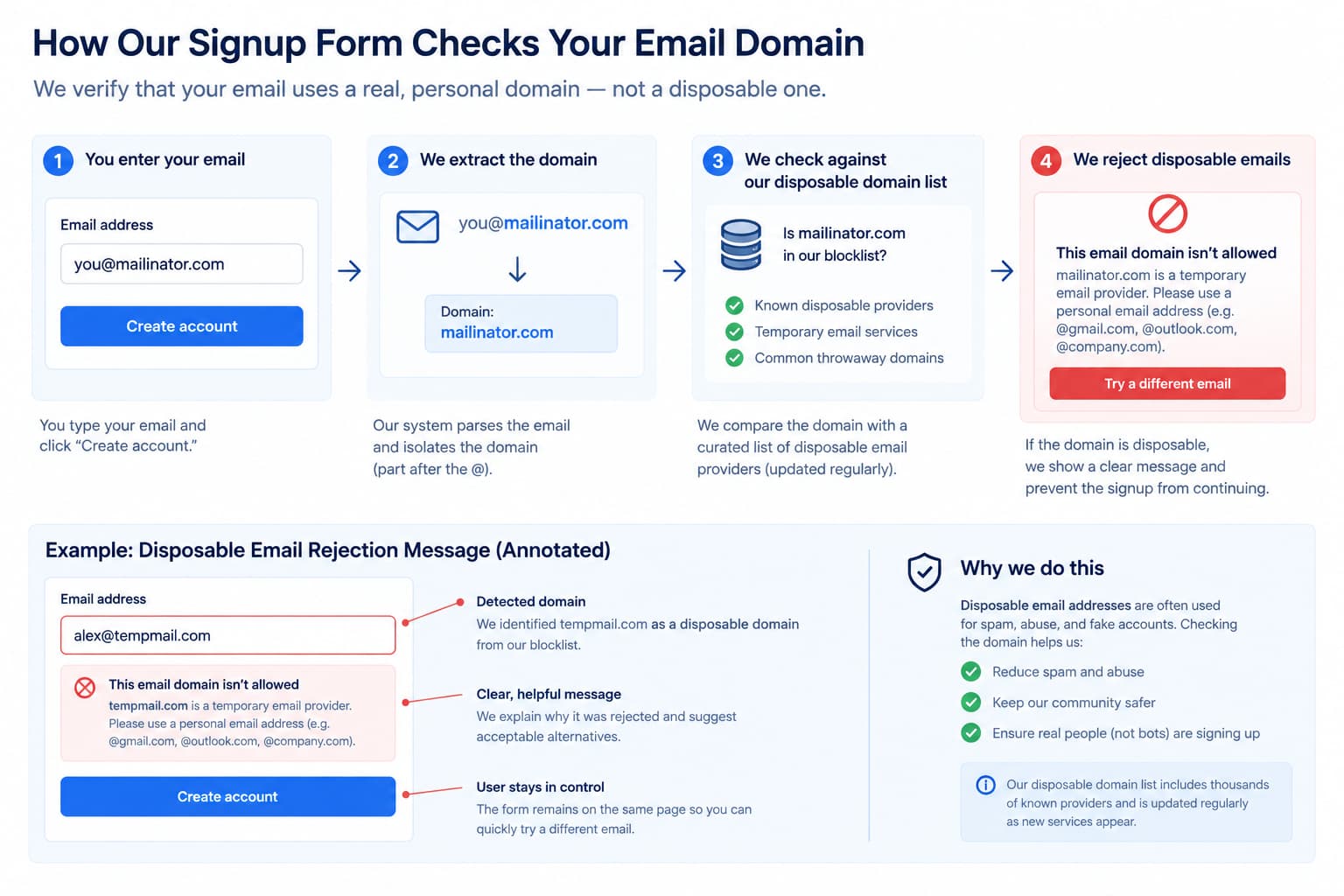
You might wonder how a website knows that an address is temporary before sending you a verification email.
In many cases, the website checks the domain portion of the address.
Consider this example:
example@temporary-domain.com
The part before the @ symbol identifies the mailbox name, while the part after it identifies the domain.
A registration system may compare that domain against a list of domains associated with disposable email services.
If the domain matches a blocked entry, the website may reject the address immediately.
Other systems may use additional checks, such as email-domain reputation, domain or mail-server information, registration patterns, or fraud-detection signals. The exact methods vary between websites.
Here are three common approaches.
Disposable email domain blocklists
A blocklist contains domains that a service has decided not to accept.
Some websites maintain their own lists, while others rely on third-party data or domain-classification services.
Blocklists can be useful, but they require maintenance. New disposable email services appear, domains change, and legitimate domains can sometimes be incorrectly classified.
Domain and mail-server checks
Some systems inspect technical information about a domain to determine whether it appears configured to receive email.
These checks can help identify certain delivery problems, but they do not reliably determine whether an address is temporary. A disposable domain can be configured to receive email correctly, and a permanent email domain can have delivery problems.
Registration and abuse signals
A website may consider patterns associated with account creation, suspicious activity, or promotional abuse.
For example, a large number of registrations within a short period might trigger additional verification.
Such signals are not necessarily specific to temporary email. They may be part of a broader fraud-prevention system.
The result is that two websites can handle the same temporary email address differently. One may accept it, while another may reject it because their policies and risk assessments differ.
8. Why Was My Temporary Email Address Rejected?
If a website rejects your temporary email address, the message doesn't necessarily mean that the address is broken.
Several explanations are possible.
The domain may be blocked. The website may maintain a list of disposable email domains and reject addresses that match it.
The service may require long-term contact. Some platforms need a stable email address for account recovery, security notifications, or ongoing communication.
The registration may have triggered another check. A website might request additional verification because of unusual activity or its own risk controls.
The error message may be generic. Some registration forms use the same message for several different validation failures, so the exact reason may not be obvious.
If you believe your registration has been rejected incorrectly, review the website's registration requirements or contact its support team.
If the service requires a permanent address, using one you control is generally the most reliable solution.
9. What Can You Do When a Website Blocks Disposable Email?
There are several legitimate alternatives, depending on why you need the address.
Use your regular email address
For important accounts, subscriptions, purchases, financial services, and services you expect to use over time, your regular email address is usually the best option.
It gives you a stable way to receive notifications and recover access later.
Consider an email alias
An email alias can provide a separate address that forwards messages to your existing mailbox or otherwise connects to your primary email account, depending on the provider.
Aliases can help separate registrations from your main address while preserving the ability to receive future messages.
They can be particularly useful when you want privacy and control without creating an entirely separate permanent mailbox.
Create a separate email account
If you frequently sign up for newsletters, online services, or nonessential accounts, a dedicated secondary email account may be more practical than relying on temporary addresses.
You can maintain access to it and use it for future notifications or password recovery.
Ask the website about its policy
If you need access to a service and believe its restriction is inappropriate for your situation, contact the website's support team.
Some services may explain their requirements or provide an alternative verification method.
Avoid trying to defeat legitimate security controls. If the website explicitly requires a permanent address, respect that requirement.
Use temporary email where it is appropriate
Temporary email remains useful for short-term tasks where the website permits it and long-term access is not required.
For example, developers can use disposable inboxes when testing email verification on their own applications, and individuals may use them for limited-purpose registrations that don't require ongoing account access.
If you need a temporary inbox, you can visit Temp-Emails.org to use the service for appropriate short-term email needs.
10. Is It Wrong to Use Disposable Email?
No. Using a disposable email address is not inherently wrong or abusive.
People have legitimate reasons to avoid giving every website their primary email address. They may want to reduce marketing messages, keep short-term registrations separate, or test software without creating numerous permanent accounts.
The important question is whether the address is appropriate for the particular service and whether your use follows that service's rules.
For example, using a temporary inbox to test a registration workflow on an application you are developing is different from repeatedly creating accounts to claim a promotion that is intended for new customers.
Likewise, protecting your primary inbox is a reasonable privacy goal, but it doesn't automatically override another website's registration requirements.
A good approach is to choose the type of email address that fits the task, understand the limitations, and respect the rules of the service you are using.
For more information about responsible use, see the Temp-Emails.org Terms of Service.
11. Is Temporary Email Safe?
Temporary email can be useful for reducing the number of websites that receive your primary email address. However, it should not be treated as a guarantee of anonymity or as a secure archive for sensitive messages.
A temporary inbox may be unsuitable for confidential information, financial documents, passwords, account-recovery codes, or other data that needs long-term protection.
You should also remember that email messages can contain suspicious links or attachments. Receiving a message in a temporary inbox does not mean that the message is trustworthy.
Before using any temporary email service, understand how its inboxes work, how long messages remain available, and what the service's privacy policy says about information handling.
You can learn more in our guide to temporary email safety and privacy and review the Temp-Emails.org Privacy Policy for information about the service's data-handling practices.
12. When Should You Use Temporary Email Instead of a Permanent Address?
The best choice depends on whether you need the address again in the future.
Temporary email may be appropriate when:
-
You need to receive a short-term verification message.
-
You are testing an application or email workflow.
-
You want to separate a permitted, short-term registration from your primary inbox.
-
You do not need long-term access to the mailbox.
A permanent email address is usually the better choice when:
-
You are creating an important account.
-
You may need password recovery later.
-
You need ongoing security or billing notifications.
-
You are registering for banking, healthcare, government, or other sensitive services.
-
You need to preserve access to messages over time.
There is no single email option that suits every situation. Understanding the difference helps you make a better choice.
Frequently Asked Questions
Do all websites block disposable email addresses?
No. Each website sets its own registration policies. Some accept disposable addresses, while others restrict them because of security, abuse-prevention, or long-term communication requirements.
Can a disposable email address be valid but still rejected?
Yes. An address may be correctly formatted and capable of receiving messages while still being rejected by a website's disposable-domain policy.
Why do websites block temporary email if it protects privacy?
Websites may recognize privacy benefits but still require a stable contact address for account recovery, security alerts, or abuse prevention. The website's decision depends on its own needs and policies.
Can I use temporary email for software testing?
Yes. Temporary inboxes can be useful for testing registration, verification, password-reset, and notification workflows, provided your testing is authorized and follows applicable rules.
Should I keep using temporary email for an important account?
No. If you need reliable access to an account or may need to recover it later, use a permanent email address that you control.
Final Thoughts
Websites block disposable email addresses for several reasons, including reducing fraudulent registrations, limiting promotional abuse, protecting online communities, and maintaining reliable contact with users.
These restrictions can sometimes inconvenience legitimate users, but they do not mean that every temporary email address is suspicious or that everyone using one has harmful intentions.
Temporary email remains a practical tool for short-term tasks, privacy-conscious browsing, and software testing when it is permitted. It is simply not the right choice for every registration.
The best approach is to understand why a website requires a permanent email address, choose an appropriate alternative when necessary, and avoid relying on a temporary inbox for anything you need to access long term.
If you need a temporary inbox for a suitable short-term task, visit Temp-Emails.org. For additional information about using the service, explore our FAQ, About Us, Privacy Policy, and Terms of Service.